Kembona Memory RAM Review: Compatibility, FPS & Buying Guide

Quick verdict: Kembona Memory RAM may be a reasonable low-cost upgrade if the exact module matches your computer and the seller provides clear specifications and a workable return policy. It does not automatically increase gaming FPS. The outcome depends on your current RAM capacity, single- or dual-channel setup, the game, and whether your CPU or GPU is the bottleneck. We have not independently benchmarked a Kembona module for this article, so we cannot claim a measured FPS gain or a proven long-term failure rate.
This Kembona RAM review helps you identify the right DDR generation and form factor, assess the listing, and decide whether a budget AliExpress module is worth buying. It also explains when adding RAM can help gaming and everyday productivity—and when it probably will not.
What Is Kembona Memory RAM?
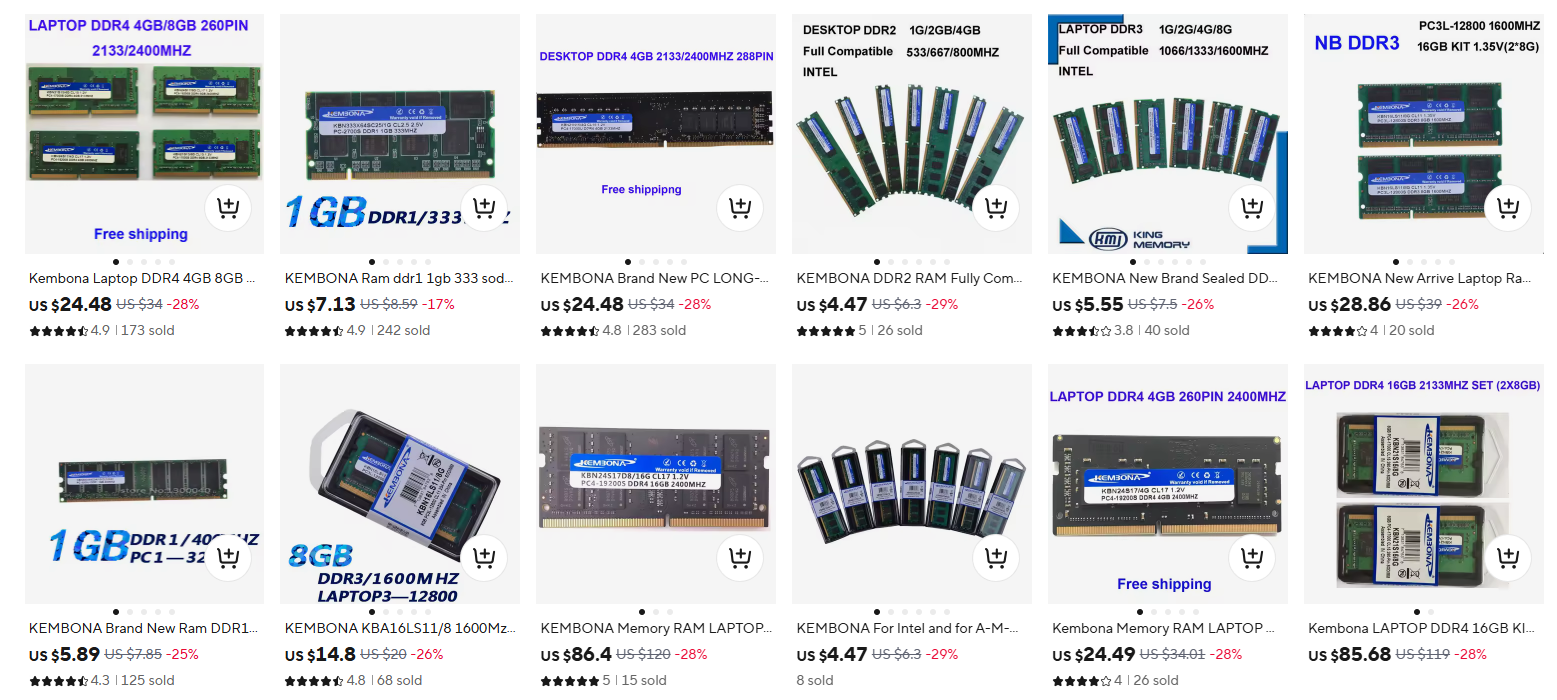
Kembona is a name found on budget memory listings across marketplaces. Search results show listings for different generations and capacities, including DDR3 and DDR4 laptop memory. There is no single “Kembona RAM” specification: a DDR3 SO-DIMM and a DDR4 desktop DIMM are different products for different systems. Judge the exact listing and module part number, not the brand name alone.
| Listing type | Typical use | What to confirm |
|---|---|---|
| DDR4 SO-DIMM | Compatible laptops and small PCs | Notebook model, DDR4 support, capacity limit, speed, and accessible slot |
| DDR4 DIMM / UDIMM | Compatible desktop PCs | Motherboard and CPU support, slot configuration, supported speed, and non-ECC requirement |
| DDR3 / DDR3L module | Older compatible systems | Exact generation, voltage, form factor, and platform support |
DDR3 and DDR4 are not interchangeable. If your computer uses DDR3, a DDR4 listing is not an upgrade path for the same slots. Check your device or motherboard manual before choosing a variant. For a broader starting point, see our AliExpress RAM buying guide. For a compatibility reference, see Crucial’s RAM compatibility guide.
Does Kembona RAM Increase FPS?
Sometimes, but the brand alone does not cause an FPS boost. If a game is running out of memory, moving from an insufficient capacity to a suitable one can reduce stutter and improve responsiveness. A move from one module to a compatible two-module, dual-channel configuration can also improve performance in some systems. If your current RAM is already sufficient and your graphics card is the limit, replacing it with Kembona RAM of similar capacity and speed may make little difference.
| Current situation | Possible outcome | Main caveat |
|---|---|---|
| System runs short of RAM during a game | Less paging and potentially smoother play after a capacity upgrade | FPS depends on the game and the rest of the PC |
| One module replaced by a compatible two-module setup | Potential bandwidth and frame-time improvement | Dual-channel operation depends on the platform and configuration |
| Adequate RAM, GPU-limited game | Little or no visible change is possible | A RAM purchase may not address the bottleneck |
| Advertised faster module installed in a slower-limited system | It may run below its advertised data rate | Check CPU, motherboard, BIOS and profile support |
Intel’s guide to choosing gaming RAM discusses capacity, speed and dual-channel operation. These general principles do not establish a measured result for a Kembona product.
How to test an FPS claim properly
Record the exact Kembona part number and compare the same game, resolution, graphics settings, CPU and GPU before and after the upgrade. Run the same repeatable scene several times, then report average FPS and 1% lows, plus RAM capacity, channel mode and actual memory speed. Without these details, a statement such as “Kembona boosts FPS by 20%” is not reliable. No such benchmark is presented here.
Will It Improve Productivity and Multitasking?
More usable memory can help when your workload exceeds the capacity you have now: many browser tabs, photo editing, large spreadsheets, development tools or several applications open at once. If Task Manager or your operating system shows consistently high memory use and heavy disk swapping during your normal work, capacity may matter more than a small change in rated speed. If memory use remains comfortable, a RAM replacement alone may offer little noticeable benefit.
For a laptop, first check whether its memory can actually be upgraded. Some models have soldered RAM, one free slot, or a mixture of soldered and removable memory. Your device manual is the best authority for its supported configuration.
Kembona RAM Compatibility Checklist: Intel, Ryzen and Laptops
- Identify the exact computer or motherboard. Look up its official specifications and supported RAM generation. A processor name alone is not enough to identify the right physical module.
- Match the form factor. Laptop SO-DIMM and desktop DIMM modules are different sizes. Check the listing photos and written specification.
- Check generation and voltage. DDR3, DDR3L, DDR4 and DDR5 have different requirements. Do not force a module into a mismatched slot.
- Confirm capacity limits. Check the maximum per slot and total capacity listed for your machine, as well as available slots.
- Read the actual speed specification. A listing’s “3200” figure describes an advertised data rate; the speed achieved in your system can be limited by its CPU, motherboard, BIOS and memory configuration.
- Check profile support before counting on it. Do not assume that a Kembona listing supports XMP or that a laptop BIOS lets you enable it. Ask for the module’s SPD/profile information if it is crucial to your purchase.
- Be cautious when mixing modules. Different capacities, timings or specifications can reduce speed or cause instability. A matched kit is usually the simpler choice when supported.
After installation, verify the detected capacity and effective speed in the BIOS or operating system. If the system fails to boot or becomes unstable, test the modules at supported default settings and consult the motherboard or laptop documentation. The MemTest86 documentation explains how memory testing can help diagnose errors; an error needs investigation and does not, by itself, prove which component is at fault.
Is Kembona RAM Reliable? What We Can and Cannot Verify
Price can make Kembona appealing, but a brand-wide reliability score would require a defined sample of modules and long-term failure data. We do not have that evidence for this review. We also cannot verify which memory chips are used in every Kembona listing; chip supplier and module revision should not be assumed from a generic product title.
Check these details before buying
- Exact variant: screenshot the selected capacity, DDR generation, form factor and advertised speed before checkout.
- Seller history: read recent reviews for the same variant, especially reports with clear photos of labels and BIOS or operating-system detection.
- Specification clarity: look for a part number, voltage, timings, module type and warranty terms. Ask the seller when essential information is missing.
- Total cost: compare the final price with shipping, taxes and any applicable fees included, against a locally available equivalent.
- Returns: read the current listing and checkout terms for your destination. Save the listing details and order record in case the module arrives faulty or different from the selected variant.
Marketplace reviews can help you spot patterns, but comments about a DDR3 module or another seller do not prove how a particular DDR4 kit will perform.
Kembona vs Other Budget RAM Brands
The useful comparison is between specific compatible modules at the final delivered price, not a generic Kembona-versus-Asgard or Kllisre ranking. Compare the same DDR generation, capacity, form factor and usable speed; then weigh seller support, return terms and documented compatibility. A slightly cheaper Kembona module may be less attractive if a locally supported equivalent costs only a little more after shipping and taxes. See our Kembona versus competitors guide for the broader buying decision.
Final Verdict: Should You Buy Kembona Memory RAM?
Consider it if you can verify a matching module, the seller’s terms are acceptable, and the final price offers meaningful savings over a comparable alternative. It makes the most sense when you have identified a real capacity or channel bottleneck and are comfortable checking the module after installation.
Choose another option if compatibility is unclear, you need a documented high-speed profile or warranty support, or an established equivalent costs about the same delivered. For gaming, buy the configuration your system needs; the Kembona label is not a performance guarantee.
Editorial note: This is a specification and buying-guide assessment, not a hands-on Kembona benchmark or durability test. Product variants, seller terms and prices can change. We will update this page when verifiable model-specific evidence becomes available. Our evaluation standards are described in the Editorial Policy.
Frequently Asked Questions
Is Kembona RAM good for gaming?
It can be suitable when the exact module is compatible and provides the capacity and configuration your PC needs. We cannot recommend a specific Kembona kit’s gaming performance without testing that kit.
Does Kembona RAM increase FPS?
It may help if your existing RAM capacity, speed or channel setup is holding the system back. It may make little difference in a GPU-limited game. This review has no Kembona-specific FPS measurements.
Does Kembona DDR4 work with Ryzen and Intel?
Compatibility depends on the exact CPU, motherboard or laptop, BIOS and memory module—not simply the processor brand. Check the device’s official memory specifications and the listing’s exact variant.
Can I put Kembona DDR4 RAM in a DDR3 computer?
No. DDR3 and DDR4 are different memory generations and are not interchangeable in the same slot.
Is a Kembona SO-DIMM the same as desktop RAM?
No. SO-DIMM is the smaller form factor commonly used in laptops and some compact PCs. Standard desktop DIMM slots require an appropriate desktop module.
How can I check a new Kembona module after installation?
Confirm detected capacity and actual operating speed, use the PC under your normal workload, and run a reputable memory diagnostic if you encounter errors or instability. Keep the order and return information until you are confident the module works in your system.
Links:
- HOME
Buying guide for RAM memory
FAQ – MEMORY RAM DDR4
PINTEREST ALIEXPRESS REVIEW
Kembona Memory RAM has gained attention for its promise to enhance FPS and productivity in gaming and professional applications. With its high-speed performance and reliable stability, users can expect a noticeable improvement in multitasking and overall system responsiveness. Many customers have reported smoother gameplay and faster application load times, validating its claims. For gamers, the increased frames per second (FPS) means a competitive edge, while for professionals, the boost in productivity can translate into better workflow efficiency. Investing in Kembona Memory RAM is a decision that aligns with both performance needs and budget considerations, making it a worthwhile addition to any setup.
[posts_relacionados limit=”3″ orderby=”rand”]
This review follows our Editorial Policy and evaluation standards.
This content may be created with AI assistance and reviewed according to our AI Usage Policy.
Related Post

Is Kembona Memory Ram Worth It? Honest Review Before You Buy
Is Kembona Memory Ram Worth It Honest Review Before You Buy DDR4 RAM Review – [...]
Is Kembona Memory Ram Good for Gaming and Workstations? Full Review
Is Kembona Memory Ram Good for Gaming and Workstations Full Review DDR4 RAM Review – [...]